Table of contents
- Need to change a service provider’s rate, but not sure how to without it affecting their pay on previous assignments?
Need to change a service provider’s rate, but not sure how to without it affecting their pay on previous assignments? #
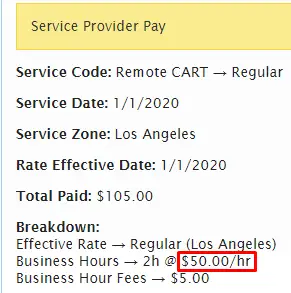
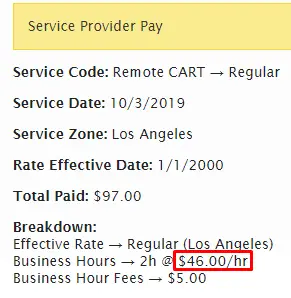
Service provider rates can change for many reasons, including additional qualifications or services provided, changes in market value for services, etc. Learn how to add new rates without affecting the service provider’s existing rates. For this example, our freelance service provider, Angle Glantz, has let us know that beginning 1/1/2020 the hourly rate she charges for Remote CART service will increase from $46 to $50 for business hours and from $51 to $55 for non business hours.

Go to People > Service Providers and click on the pencil (edit) icon next to the service provider that needs a rate change.


From the Pay Rates tab click on Add Another Pay Rate.

Select the appropriate service zone(s) and service code the new rate will apply to. Then fill out the new effective date, BH rate, Non-BH Rate, and subsequent rate information for the new pay rate.

Select Save Changes.
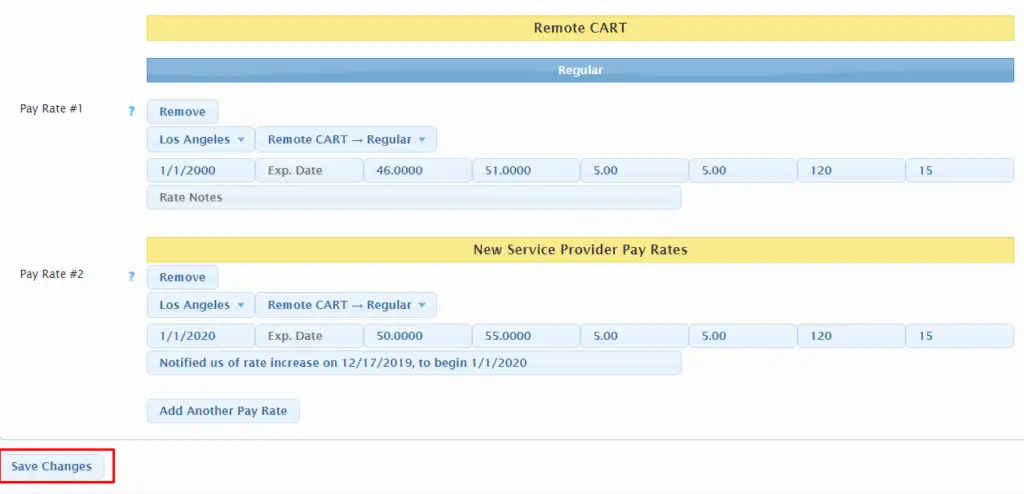
Now, for any requests that Angle Glantz is assigned to for this service zone and service code between the start of her first pay rate through 12/31/2019 her old pay rate will apply:
and requests from 1/1/2020 onward her new pay rate will apply: