
This feature is a group-level setting to limit which services to allow for a group. #
On the group’s page (People > Groups), a “Services” tab can be found. This page will display any services inherited from parent groups and/or allow you to add eligible service(s) for the group. This tab can be edited by staff who have one of the following roles assigned: Administrator, Manager, Scheduler, or Billing.
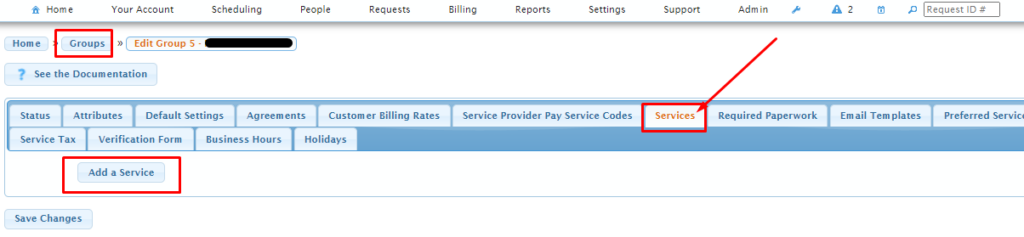
If the list of services is blank (including from parent groups) then all services are available. It is only when at least one service has been added to this tab page that any request falling under the group then becomes limited to the resulting list of services.
The limiting of services for the group becomes effective as of the time the service is added to the group (prior requests with different services assigned will not be impacted). If one does not wish to utilize this feature, then no action is required – the feature only becomes effective for the group if service(s) are added to this tab page, or to the same page on a parent group.
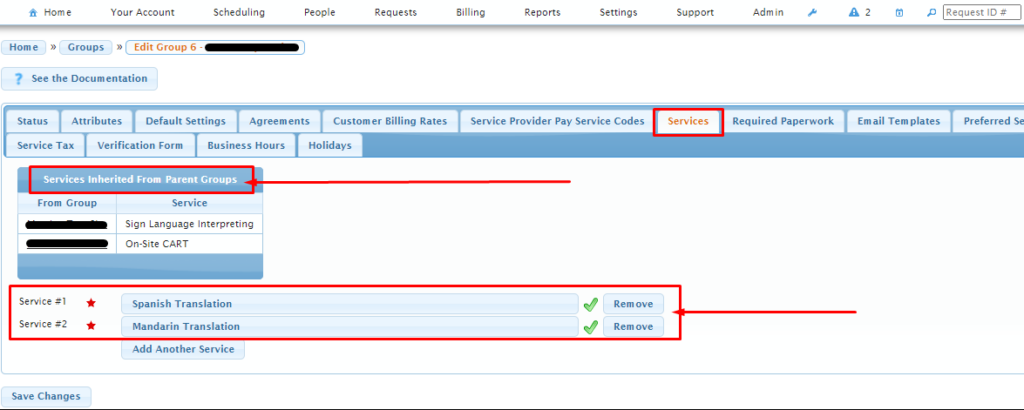
Any service settings entered on this page will affect the list of available services for the group:
- on request confirmation screens
- per group member on the “Clients” tab of a service request
- per service provider slot on the “Service Providers” tab of a service request
In addition, when one uses the “Add Service Provider Slots to Recurring Service Requests” button on the request’s actions menu, the dropdown list of available services on the subsequent screen will also be limited.
For experienced Usked users, this feature functions very much like the “Customer Billing Rates” and “Service Provider Pay Service Codes” tab pages do – services can similarly be added and saved like service codes are on those pages. Services also inherit from parent groups (just like service codes).