Need to add a new person that is requesting services or a client receiving the services in your Usked portal? Read more to find out how. #
If you already have the request open and want to add a new requester or client directly from within the request, please see this article.

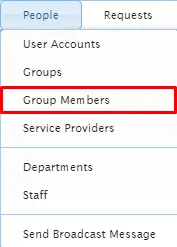
From the top menu of your Usked portal, go to People > Groups Members.

Option 1: #
If you’d like to add this new requester/client to just one group click on:

Option 2: #
If you’d like to add this new requester/client to several groups under the same parent group click on:


For Option 1: #
If the user account has already been created, type in the user’s name and select from the options that populate, then do the same for the Group you’d like to add them to before clicking on Save Changes.
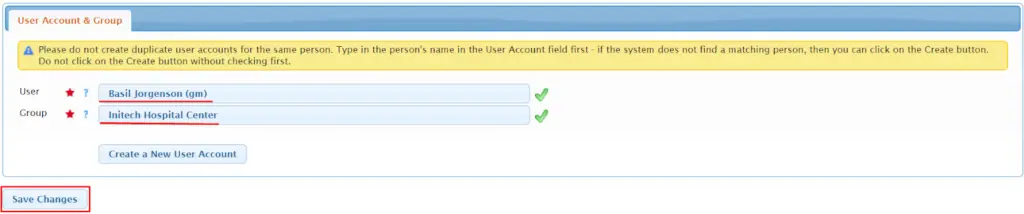
If you have typed the person’s name into the User field and the system does not populate a match, then click on:

Then follow steps 3 & 4 from How to Create a New User Account before repeating the first part of this step and continuing.
For Option 2: #
If the user account has already been created, type in the user’s name and select from the options that populate, then for Group type in and select the parent group you’d like to add them to.

If you have typed the person’s name into the User field and the system does not populate a match, then follow the steps in How to Create a New User Account before continuing.

For Option 1: #
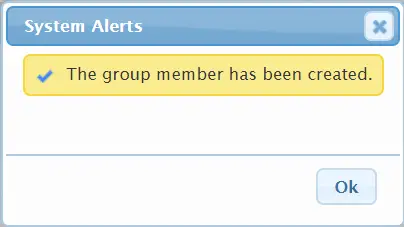
Click on Ok.
For Option 2: #
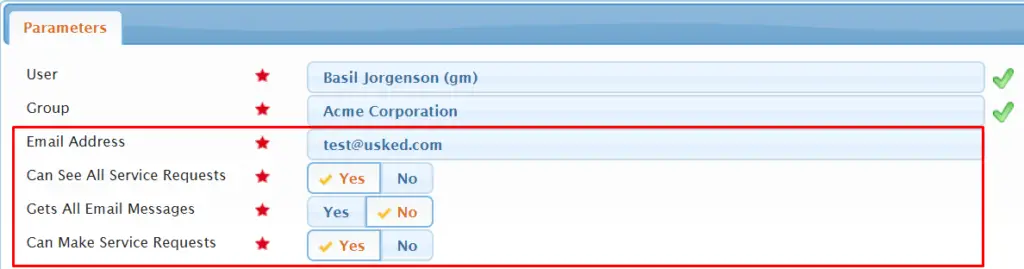
Next, type in the person’s email address and choose Yes or No for each setting as desired.

For Option 1: #
Next, click on each tab for this group member to fill out relevant information, such as contact information, if this group member can make requests and/or see all service requests, etc.

For Option 2: #
Select Add User to Groups and All Subgroups.


For Option 1: #
Select Save Changes.

For Option 2: #
Verify the group member name and total number of groups that the group member will be added to by selecting Go Ahead and Create/Update Them.
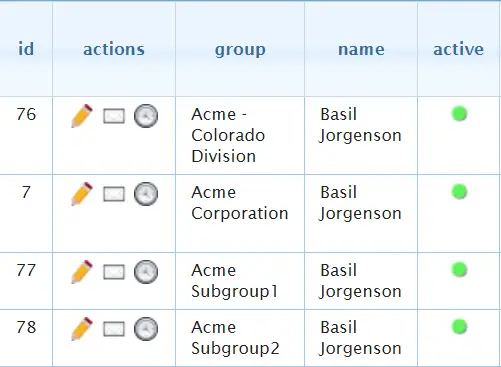
You will now see this example group member has a group member profile for each subgroup under the parent group “Acme Corporation”.