
The sun is shining, the birds are singing, and service providers on location is making a come back. Read more on how to support your business in the transition back to on-site service. #

It might feel strange for service providers to be returning to on-site work after months of virtual service from home, so we came up with a list of things you may need to consider to support this transition. #
1. Paperwork #
You can use paperwork to help keep track of documentation like:
- Vaccination records
- PPE or Health related policy acknowledgements
- Test results
You can make paperwork definitions required, so if your service provider has not submitted required paperwork they will not be eligible for work that requires it.
Take a look at these articles for more on how to setup and upload paperwork.
2. Verification Forms #
Verification forms allow service providers to collect a signature and/or upload a form or photo through the app! This would be particularly useful for assignments that need a Symptom screening questionnaire or proof of vaccination/test results for the assignment. Our Verification Form Feature article will walk you through setting this up!
3. Email Templates #
As part of your confirmation email templates you may want to add information about health guidelines! This makes sure your service providers are aware of any safety protocols, like when to stay home and who to notify if they aren’t feeling well. To edit existing email templates, simply go to Settings>Email Templates and click on the pencil icon next to the desired email template. If you’d like to create a new email template, take a look at this article.
4. Tags #
Tags can be a helpful tool to label service requests for reporting or visibility. Here are examples of a few tags relevant to on-site work now:
- PPE required
- On-site symptom screening
- Cancelled due to COVID
You could add tags like these to service requests as an indicator to service providers about what to expect or even as a way to report out on the number of requests affected by various protocols/cancellations. Take a look at our article “All About Tags” for more info.
5. Dress Codes #
We have all gotten used to wearing our comfy pajamas while working from home. Now that people are going back on-site, you can use dress codes to set expectations on what is appropriate to wear while out on assignment. This can include things like PPE. For example, if the dress code for the assignment is Business Attire but this assignment will also require service providers to wear a mask, you can create a dress code “Business Attire + Mask” to select in the assignment.
If you want to add new dress code options, go to SETTINGS > DRESS CODES > CREATE A NEW DRESS CODE.

6. Notes #
It’s been a minute since we’ve had to figure out where we were going! Make sure that in your service request, you have the location set up with a physical address if the service will be performed on-site.
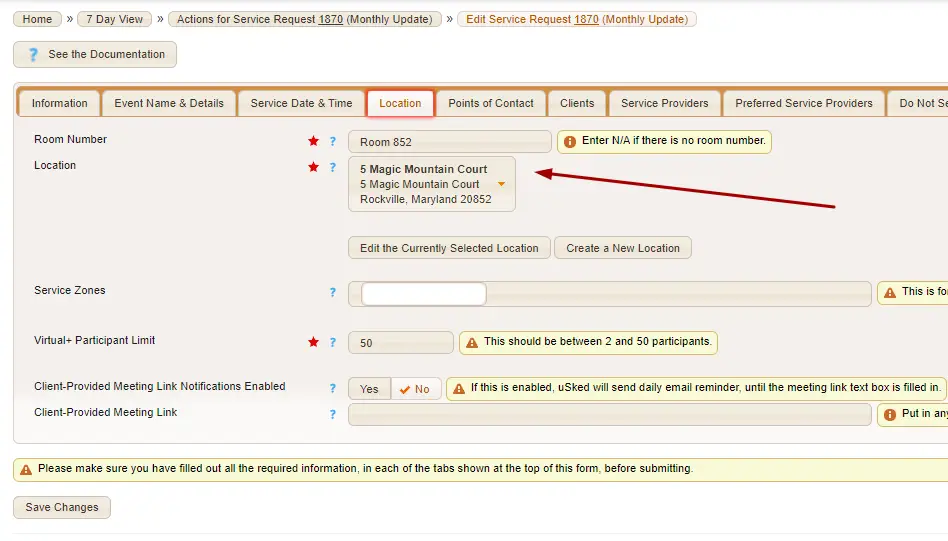
Additionally, you may want to consider adding safety protocol or health guidelines to the location notes for on site locations that have specific protocol they ask of all on-site people. Then, as long as your confirmation email template is setup to reveal Location notes, service providers will see the new health guidelines/protocol for each on-site location.