
Let’s talk about the magic that is email automation in Usked! #
GLOBAL AUTOMATIC EMAILS #
Did you say magic? Tell me more! Where do I find this? #
There are certain conditions, that when met will trigger Usked to send out an automatic email message without you needing to click a button. You can control which email template is used for each of these conditions by setting them in SETTINGS>DEFAULT EMAIL TEMPLATES.
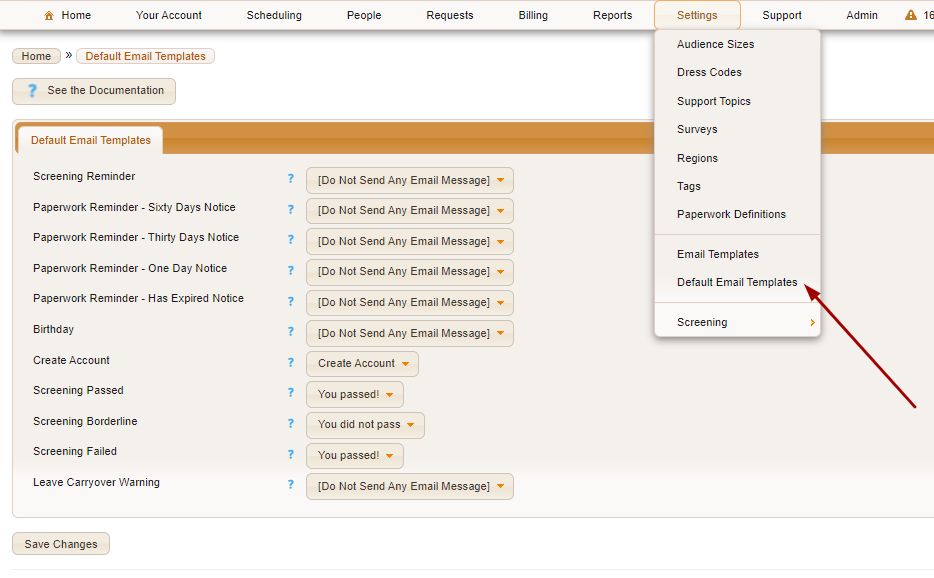
Let’s talk about what each of these default templates is for! #
#
Screening Reminder #
This is sent on a weekly basis on Monday mornings, to service providers that have started the screening process but have not completed it.
Paperwork Reminder – Sixty Days Notice #
This email message is sent to service providers for any paperwork that will expire in exactly 60 days unless the send reminders flag is set to no.
Paperwork Reminder – Thirty Days Notice #
This email message is sent to service providers for any paperwork that will expire in exactly 30 days unless the send reminders flag is set to no.
Paperwork Reminder – One Day Notice #
This email message is sent to service providers for any paperwork that will expire the following day, unless the send reminders flag is set to no.
Paperwork Reminder – Has Expired Notice #
This email message is sent to service providers for any paperwork that has expired, on the first day the paperwork is expired, and every 30 days afterward, unless the send reminders flag is set to no.
Birthday #
This email message is sent to all service providers on their birthday.
Create Account #
This email message is sent as part of the self-create customer, and the self-create service provider feature. This email message is also sent when an authorized signatory invites other members of their organization into their group. It is sent after immediately the user gives their email address, and is used to verify that this email address exist and belongs to this user.
Screening Passed #
This email message is sent to candidates that have been marked as passed screening during the finalize screening process.
Screening Borderline #
This email message is sent to candidates that have been marked as borderline passed screening during the finalize screening process.
Screening Failed #
This email message is sent to candidates that have been marked as failed screening during the finalize screening process.
Leave Carryover Warning #
This email message is sent on October 1st of every year, to any staff that has more leave hours remaining in their balance than is allowed to be carried over into the next year.
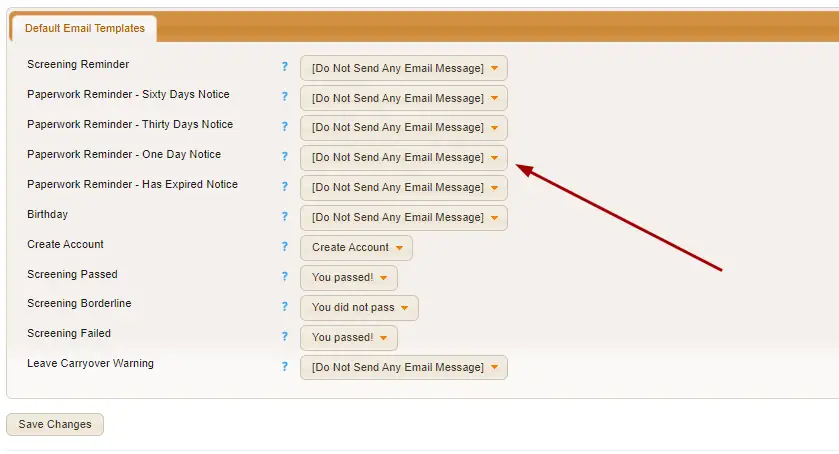
Again, to decide what emails you’d like to be in place for each of these templates, you can click on the drop-down menus here. If you don’t want an email sent when a condition is met, simply select “[Do Not Send Any Email Message].”
GROUP LEVEL AUTOMATIC EMAILS #
These email template settings can be customized at the group level by visiting the Email Templates tab in the Group profile.
Provider Interested Email Template #
Select the email template you want Usked to use, when sending an email to the service provider that has clicked on the I’m interested icon.
Provider Not Interested Email Template #
Select the email template you want Usked to use, when sending an email to the service provider that has clicked on the I’m not interested icon.
Address Region Changed Email Template #
Select the email template you want Usked to use, when sending an email to the group member that has changed his or her mailing address.
Service Request Updated Email Template #
Select the email template you want Usked to use, when any user has made any major changes to a service request, or when a service request has been submitted as pending confirmation. This email message is sent to the requester, and all of the administrative group members for this group that has gets all email messages enabled. If there are less than 9 business hours remaining before the start of the service request, the [Urgent] label is added to the beginning of the subject line of the email.
Service Request Canceled Email Template #
Select the email template you want Usked to use, when sending an email to all service providers assigned to this service request if it is canceled. Service providers assigned to blocks, or assigned to contract days overlapping this service request, will not get this email.
You Didn’t Get The Assignment Email Template #
Select the email template you want Usked to use, when sending an email to all service providers that have clicked on the I’m interested icon, that are not assigned assigned to this service request.
Email Me This Service Request Email Template #
Select the email template you want Usked to use, when sending an email to the user that has clicked on the email me this service request button.
Agreement Signature Notification Email Template #
Select the email template you want Usked to use, when sending an email to the billing contact of the group when an authorized signatory has signed an agreement.
Client-Provided Meeting Link Reminder Email Template #
Select the email template you want Usked to use, when sending out daily reminders to requesters to fill out the blank client-provided meeting link field.
BUILT IN AUTOMATIC EMAILS #

These emails are set and sent by Usked and cannot be changed.
- Email blast logs
- When a leave request is submitted
- Errors found while running the daily scripts
- Pending leave request reminders
- When a survey has been submitted
- User ID and password reset instructions
- When someone self-creates a user account
- When someone uses the speak-with-a-representative feature
- When a service provider is ready to be evaluated
- When an evaluator has finished evaluating a service provider
- When help is requested while evaluating a service provider