
In this article, we are going to talk about what email templates are, where they are stored, and how you can edit them! #
 #
#
I want to send emails about assignments, account creation, screening….all kinds of stuff! I can do that in Usked? #
Yes! When you start in Usked, you are given a number of base templates to start from. You are more than welcome to customize them and add whatever kinds of email templates you need.
Where can I find email templates? #
If you navigate to SETTINGS > EMAIL TEMPLATES, you will find all of your email templates.
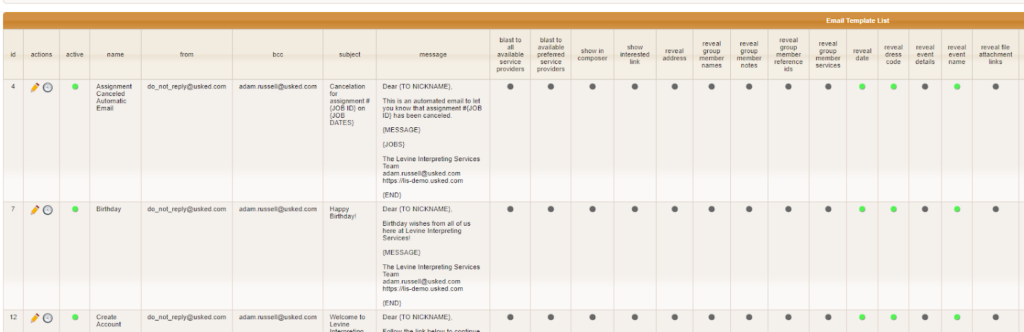
When you land on the page, it will look something like this:
Let’s go over what each option is… #
ID – This is the ID of the email template.
Actions –
- The pencil icon is where you can edit your email template! All of the fields we talk about below can be edited here.
- The clock icon is for the history of the template. There, you can see when it was created and later edited at any given time by whom.
Name – This is the name of your email template. This is how your team will internally identify the email template and what will show up in the email composer if you set the email template to show up there.
From – This is the email address you’d like the emails that use this template to send from and where you want to receive replies. If you do not want replies back from the email a do-not-reply email address is used here.
BCC – This is for whomever you’d like BCC’d on the email, so this recipient gets a copy of whatever is sent out.
Subject – This is going to be the subject of the email that you send out. We recommend you use tags so each email is catered to a specific job, date, etc. More on tags below.
Message – This is the message you would like to send for this template. Again, using the tags from the article listed above, you can cater it to specific people at specific times. More on tags below.
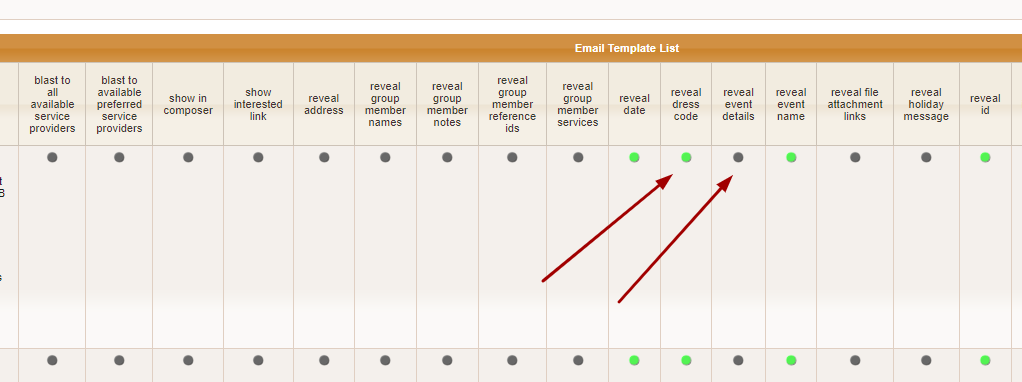
The rest of the fields are what you’d like to be visible on each template. Green means YES and Gray means NO.
Can I pull in information like first name or job # into an email template? #
Yes! Email template tags make it possible to pull in other information to send in the email’s subject and message. For a detailed list of the tags available head over to this article.
What are the email templates provided to me by Usked and what are they used for? #
Great question! For a list of provided email templates and their purpose visit here.
How can I create an email template? #
Check out this article to learn how.
How do I send an email using an email template? #
If you’d like to manually send an email that uses one of your email templates you’ll need the email composer. For more on the what, where, and how of the email composer take a look here.
How do I set emails to go out automatically? #
Look here to find how to set automatic emails at global and group levels and also which emails the system automatically sends for you.