
The purpose of this feature is to send out request reminders to requesters, clients, or point of contacts. This feature can be used as a time and money saving tool, as it allows for automated sending of emails with a link to cancel the request if services are no longer necessary.
In the settings for each group, there is now a “Request Reminder” tab:
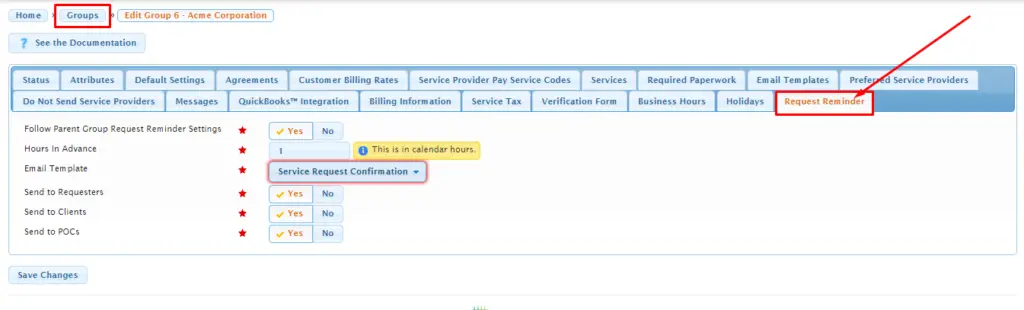
The default settings here are as follows:
- “Follow Parent Group Request Reminder Settings” is toggled to “yes”.
- “Hours In Advance” is set to “72” calendar hours.
- “Email Template” is set to “[Do Not Send Any Email Message]”.
- “Send to Requesters”, “Send to Clients, and “Send to POCs” are all toggled to “yes”.
The creation of these settings at the group level allow for maximum flexibility in managing email workflows. Here, the Usked licensee is provided with more efficient control and customization options. These default settings should be adjusted to match the needs of your organization, including selection and assignment of an actual email template with the “request reminder” language that you wish to use.
Points of Contact (POCs) cannot log in Usked as they are not users or group members, and there is no requirement an email address be entered for each POC on a request. If POCs need to routinely receive request reminder emails, they should be added as to Usked as requester or client group members.
Also important to note is that any time the “Follow Parent Group Request Reminder Settings” is toggled to “yes”on a group, then every single one of the remainder of the settings on this tab is ignored – meaning, it’s always “follow the parent group” OR follow the other five settings, but not both.
In addition, on each group member profile, on the “Attributes” tab, there is now a list item “Receives Request Reminders”, and the default is toggled to “yes”:

The addition of this ‘’opt-out’ toggle at the group member profile level allows individual members to opt out of receiving these emails while permitting the remaining group members to continue receiving them.
With this feature, every fifteen (15) minutes, Usked will::
- Build a list of all groups that have “follow parent group” set to “no”. These are all the “top level” groups.
- For each group in that list, Usked will then create a list of all child groups that have “follow parent group” set to “yes”. Usked will stop going down the child group hierarchy, when it finally reaches a group that has its “follow parent group” set to “no”.
Usked will then have separate lists of groups. For example, if we have groups A, B, C, D, E, F, G and they are set up in the hierarchy as:
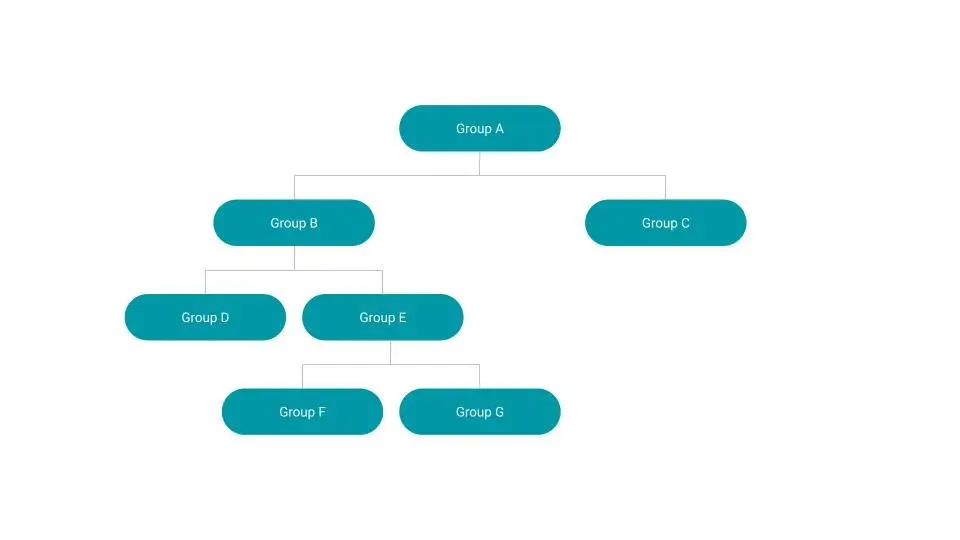
And if all groups have “follow parent group” toggled to “yes” except for groups A and E, then Usked would conclude with two lists of groups:
- List 1 – A, B, C, D (all settings follow Group A)
- List 2 – E, F, G (all settings follow Group E)
Next, Usked will process each group list as follows:
- If the setting for email template on the parent group is “do not send any email message” then Usked moves on to the next group list.
- If all three “send to” settings (requesters, clients, POCs) are set to “no” then Usked moves on to the next group list.
- Usked then compiles a list of all non-canceled service requests, that fall under any of the groups in the list, and that are due to start the set “hours in advance” in the future. Each service request is then processed as follows:
- If the “send to requesters” is set to “yes”, then an email is sent to the requester if the requester group member has their “receives request reminders” also set to “yes”.
- If the “send to clients” is set to yes, then an email is sent to each client on the request if that client group member has their “receives request reminders” also set to “yes”.
- If the “send to POCs” is set to “yes”, then an email is sent to each POC that has an email address entered.
Any email that is sent will have the {message} tag within its template replaced with a link that the reader/user can then click on. This link will take the user to the cancel request screen only if the user is either a requester, or a client with the attribute “can make service requests” enabled on their group member profile. If the user does not have the attribute “can make service requests” enabled on their group member profile, or is a POC (no group member profile), they will get a link to the job actions screen instead, which can then be forwarded to the requestor (or group member) who has access to Usked to implement any necessary cancellations.